Receipts in, invoices out, GST sorted.
Kitty keeps the books for freelancers and small businesses, entirely on your Mac. Drop a receipt into the slot and it reads the vendor, total and GST for you. Send invoices with the right tax and a UPI code, see who still owes you, and hand your accountant one tidy bundle at year end.
Pay once · macOS 14+ · Apple silicon & Intel · No account, no cloud · Already bought? Download Kitty
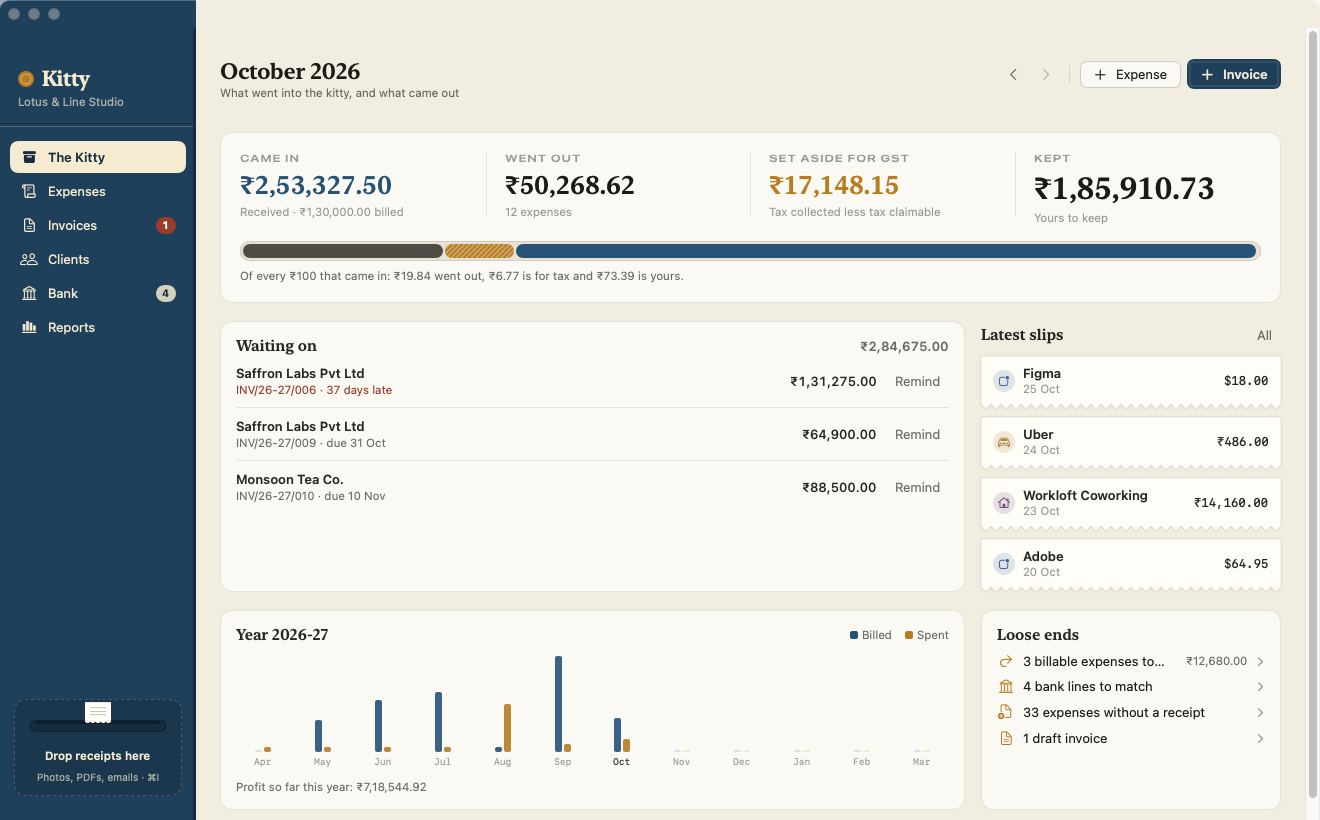
A working model, not a video — sample data. Receipts here are pre-read samples and the UPI code points at a made-up ID; the real app reads your own receipts on your Mac. In Kitty these shortcuts take ⌘ (and ⇧ for N and P).
- Pay once, no subscription
- No account, no cloud
- Receipts read on your Mac
- GST-ready invoices
- 14-day refund
Every rupee, in its place.
Expenses, invoices, payments and the bank, in one tin. Kitty does the arithmetic and the paperwork; you check it and press Send.
Drop it in the slot
Photos, PDFs and saved .eml emails are read with Apple’s on-device text recognition. Kitty picks out the vendor, date, total, tax, CGST/SGST/IGST and the vendor’s GSTIN, so you only check them.
GST that’s right by default
CGST + SGST or IGST, chosen from the place of supply. Exports and SEZ supplies go out zero-rated, under LUT or with IGST. GSTINs are checked down to the check digit, and every tax invoice carries an HSN/SAC summary.
Invoices you’d be proud to send
A clean A4 page with your logo, bank details, the amount in words and a UPI QR code for the balance due. All the Rule 46 particulars, one accent colour, and text your client can select.
Numbering without gaps
Drafts get a number only when you issue them, from series like INV/{FY}/{###} that restart each financial year. Issued invoices can be voided, never deleted.
Getting paid, tracked
Part payments, TDS your client deducted, credit notes, estimates that turn into invoices, and what’s overdue by how long. Reminders open as ready-to-send drafts in Mail — friendly, firm or final — with the PDF attached.
Every expense filed
Categories and rules, projects, payment methods, billable expenses you can re-bill in one click, mileage at your own rate, and recurring costs that add themselves.
Multi-currency, offline
Bill a US client in dollars or log a euro subscription. Each record keeps the exchange rate you typed, so your reports never shift under you.
Bank statements matched
Import CSV, OFX or QIF — or, for a PDF-only statement, the export from our app Tabulate. Kitty suggests the expense or invoice each line belongs to and links the obvious ones for you.
Reports an accountant can use
Monthly profit and loss (by invoice date or by payment received), spending by category, a GSTR-3B style summary with input tax credit, GSTR-1 style B2B, B2C, export and credit-note sections, and what you’re owed.
The year-end bundle
Every invoice and credit note as a PDF, every receipt renamed like 2026-10-14 vendor 640.00.png, CSVs for invoices, payments, expenses and clients, plus P&L and GST summaries, in one zip.
Not in India? Still yours
Choose VAT, GST (Australia, New Zealand, Singapore…) or sales tax with your own rates and tax-ID label, any home currency and any financial-year start. The Indian extras switch off.
Your books, one folder
kitty.json, your receipts by month, invoice PDFs and 14 daily backups. Keep it where it is, or move it to any folder — including one in iCloud Drive.
Comparing expense trackers? Read the guide: the best expense tracker apps for Mac
It prepares. Your accountant files.
Kitty keeps every invoice GST-compliant and hands you the summaries. It doesn’t pretend to be a filing service.
What Kitty does
- CGST + SGST or IGST from the place of supply, and UTGST in union territories
- Exports and SEZ supplies under LUT (no IGST) or with IGST paid
- GSTIN checks down to the check digit, with the state read from it
- Gap-free numbering per financial year; void, never delete
- Input tax credit on the expenses you choose to claim
- GSTR-3B and GSTR-1 style summaries with HSN/SAC totals
What it doesn’t
- File returns or connect to the GST portal
- E-invoice IRNs or e-way bills
- Reverse charge supplies and cess
- Payroll, inventory, or team roles and approvals
- Fetch exchange rates or log in to your bank (by design)
If your turnover means you must e-invoice, Kitty isn’t enough on its own. The tax rules it does handle are covered by over 300 automated checks in its own source.
Every page of the books, light and dark.
Screenshots straight from Kitty, with its sample books. Flip between light and dark.


What stays. What connects.
Your books are your business. Kitty has no account and no server; everything lives in one folder on your Mac.
Stays on your Mac
Your books, and everything Kitty works out from them.
- ✓Your books
kitty.json, receipts by month, invoice PDFs and daily backups, in one folder you choose - ✓Your receiptsRead with Apple’s on-device text recognition; nothing is uploaded
- ✓Bank statementsImported from files you download; Kitty never logs in to your bank
- ✓Clients and invoicesKept in your books; emailed only when you send them
- ✓How you use itNo account, no analytics in the app
Connects
Two small requests over HTTPS, plus mail you send yourself.
- 1License checkYour key and an activation ID, to Dodo Payments
- 2Update checkApp name and version, to
kitty.newmac.app - 3Your email app, when you chooseInvoices and reminders open as drafts in Mail; you press Send
If you move your books folder into iCloud Drive, Apple syncs it like any other file. The full list, for every app, is in the privacy policy.
Pay once. Keep it.
One payment, no subscription — less than a year of most cloud accounting plans. Choose how many Macs you’ll use Kitty on.
3 Macs
For your desk and travel Macs
5 Macs
For a small studio, one set of books per Mac
Checkout opens soon. The buttons above go live here the moment it does.
Every plan includes
- One payment, no subscriptionEvery feature, yours to keep.
- License key by emailSent the moment you pay. Activate in one click.
- Move between MacsUse “Deactivate this Mac”, then activate on the new one.
- Free updatesNew versions install themselves.
- 14-day refundNot for you? Read the refund policy.
- macOS 14 or laterNative on Apple silicon & Intel.
Already bought? Download Kitty · .zip · Install help
Questions, answered.
Where are my books kept, and does anything leave my Mac?
In one folder on your Mac (Application Support by default). It holds kitty.json, your receipts by month, invoice PDFs and 14 daily backups, and you can move it to any folder, including one in iCloud Drive. Kitty has no account and no server. Receipts are read on your Mac, and the only network requests are the license and update checks.
Is it a GST filing tool?
No. Kitty keeps invoices GST-compliant and gives you GSTR-1 and GSTR-3B style summaries with HSN totals to help you or your accountant file. It doesn’t connect to the GST portal, file returns or generate e-invoice IRNs or e-way bills. Reverse-charge supplies and cess aren’t handled.
How accurate is receipt reading?
Very good on clear printed receipts and PDF invoices. Faded thermal paper, handwriting and crumpled photos may need corrections. Every field stays editable, and the original receipt is always one click away.
Does it fetch exchange rates or connect to my bank?
No, both by design. You type the rate your bank gave you, and you import the statements your bank lets you download (CSV, OFX, QIF). For PDF-only statements, our app Tabulate converts them, and Kitty imports its CSV or JSON export directly.
Which permissions does it ask for?
None at launch. macOS may ask once if you drop in receipts from Desktop, Documents or Downloads. Kitty never sends email itself: it opens a draft in Mail (or your email app) for you to send.
Does it work outside India?
Yes. Choose VAT, GST (Australia, New Zealand, Singapore…) or sales tax with your own rates and tax-ID label, any home currency and any financial-year start. Indian extras like UPI QR codes and GST summaries switch off.
Can my team use it together?
Kitty is for one person’s books on one Mac at a time. You can keep the books in iCloud Drive to switch between your own Macs, but don’t open them on two at once. There are no user roles, approvals or payroll.
What do I need?
macOS 14 Sonoma or later, on Apple silicon or Intel. A license covers 1, 3 or 5 Macs.
macOS says it can’t verify the developer.
Kitty is distributed directly from this website. Here’s how to open it the first time.
Is there a free trial?
No. Use the working model at the top of this page to see exactly how Kitty works: drop a receipt, make an invoice, record a payment. If it turns out not to be for you, you can ask for a refund within 14 days — see the refund policy.
Can I use Kitty on more than one Mac?
Yes. The 3-Mac and 5-Mac plans cover several Macs with one license key. Any license can move to a new Mac: choose “Deactivate this Mac” in Kitty on the old one, then activate on the new one.
Empty the shoebox into the tin.
Drop in this month’s receipts, send the next invoice from Kitty, and year end becomes one click.